Skip to Content
Home
Get Started
Testimonials
Testimonials
Online Courses
Online Inventory Course
New Client Assessment
New Client Assessment Form
How to invite us to your Cin7 Core system
Articles & Blog
Cin7 Core Blog
Inventory-software-guide
Cin7-core-xero-integration
Ai-with-purpose
Connected-inventory-performance
Geopolitical-risks-in-supply-chains
How AI can help inventory inefficiency
Inventory-cycle-count
Inventory management guide for small businesses
Retail-trends
Cin7 Server Status
About-us
Request a demo
0498 509 217
Sign in
Contact Us
Home
Get Started
Articles & Blog
Cin7 Core Blog
Inventory-software-guide
Cin7-core-xero-integration
Ai-with-purpose
Connected-inventory-performance
Geopolitical-risks-in-supply-chains
How AI can help inventory inefficiency
Inventory-cycle-count
Inventory management guide for small businesses
Retail-trends
Cin7 Server Status
About-us
Request a demo
0498 509 217
Sign in
Contact Us
Courses
Inventory Module Fundamentals v2
Knowledge check
Nav
Home
└
Inventory Module Fundamentals v2
└
Knowledge check
Inventory Module Fundamentals v2
0
%
Completed
Course content
Welcome
Welcome back to the Inventory module!
By the end of this course, you should be able to:
Managing Stock
Conduct a stocktake with accuracy and flexibility
Stocktake vs. adjustment
Example: Indoorsy
Set up the stocktake
Fields to know
10 xp
Quiz
Stocktake protections
5 xp
Quiz
Run the stocktake
10 xp
Quiz
Perform a manual count
Import a stocktake
Add items back into inventory
Best Practices
Knowledge check
10 xp
Pause and think
Check your stocktake
Complete the stocktake
Demo: Complete a stocktake video
Try it yourself: Complete a sample stocktake
Stock Adjustment
Make a stock adjustment
3 Steps - stock adjustment
Demo: Make a stock adjustment video
Knowledge check
10 xp
View stocktakes and adjustments
Transferring Stock
Transferring stock
Stages of a stock transfer
Video: 5 phases of a stock transfer
Knowledge check
10 xp
Stage 1: Transfer Order
Complete a stock transfer
#1 Complete the stock transfer header.
#2 Add product lines.
#3 Authorize the transfer order.
Knowledge check
10 xp
Stage 2: Order Pick
Stage 2: Order Pick
#1 Add product lines.
#2 Specify Batch, Serial, Expiry, and/or Bin (if applicable).
#3 Specify Transfer Quantity.
#4 Specify Sent Date.
#5 Send Stock.
Knowledge check
10 xp
Stage 3: In Transit
Stage 3: In Transit
Stage 4: Put Away (receive)
Stage 4: Put Away (receive)
#1 Add product lines.
#2 Specify Batch, Serial, Expiry, and/or Bin (if applicable).
#3 Specify Received Quantity.
#4 Specify Received Date.
#5 Mark the Put Away phase complete.
Stage 5: Stock Transfer Complete
Stock Transfer Complete
Demo: Complete a stock transfer
Knowledge check
10 xp
Try it yourself: Complete a stock transfer
Simplify your stock transfer
Simplify your stock transfer
Skip Stock Transfer Order
Skip Order Pick and Put Away
Skip Pick, In Transit, and Put Away
Skip Order, Pick, In Transit, and Put Away
Pause and think
Finished
CERTIFICATION TEST
Inventory Module Fundamentals (Part II)
Knowledge check
10
XP
Prev
Next
Fullscreen
Share
About
Comments
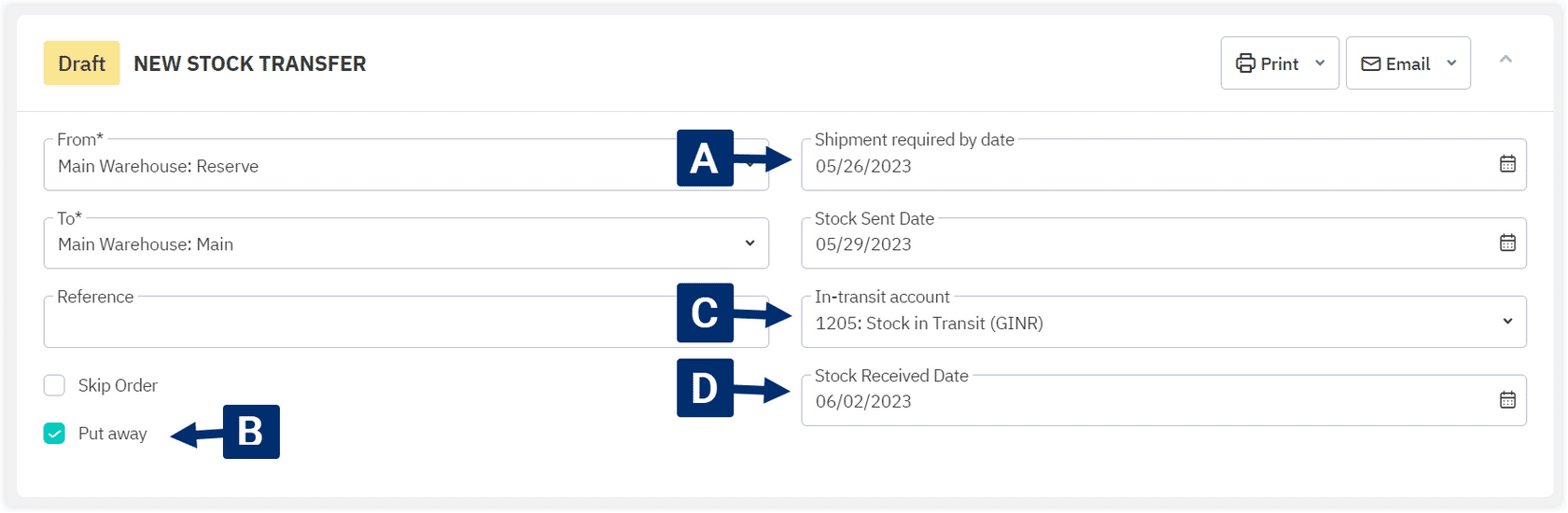
One of the fields in this transfer order hasn’t been filled in correctly. Which is it? (Click to zoom.)
Commenting is not enabled on this course.
1
.
One of the fields in this transfer order hasn’t been filled in correctly. Which is it? (Click to zoom.)
A
B
C
D